Like having a guard
on staff, 24/7.
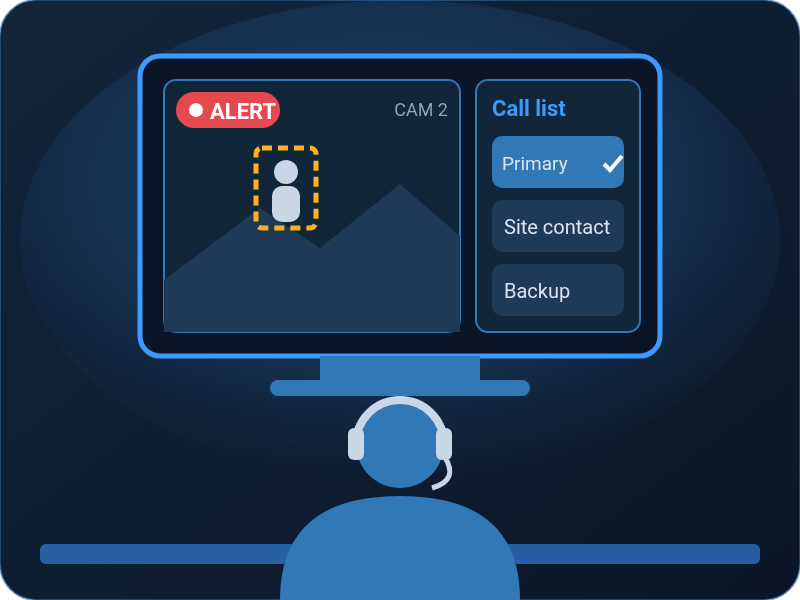
Remote video monitoring for the cameras you already have. You choose the alerts that matter. When one comes in, day or night, a live person reviews it, contacts the people on your call list and, when your instructions call for it, dispatches the authorities.
- Alerts you chooseDoors, lots, after-hours activity, whatever matters to you.
- A live personReviews each alert at a US-based monitoring center.
- Your call listThey contact your people and, per your instructions, dispatch the authorities.
- Set up locallyBy the AdvanTech team that installed your cameras.
Real people
behind your cameras.
Most camera systems just record. You find out what happened the next morning, after it’s over.
Remote video monitoring adds a live person to the cameras on your AdvanTech system. You pick the alerts that matter, and when one comes in, an operator at a US-based monitoring center reviews it, reaches the right people on your call list and, when your instructions call for it, dispatches the authorities.
- Coverage around the clock for the alerts you choose
- A live person reviews each alert
- Works with the cameras you already have
Three simple
steps.
Here’s what happens when one of your alerts goes off.
You Choose the Alerts
Pick the camera activity you want watched, like motion at a door or a vehicle in the lot after hours.
A Live Person Reviews It
When an alert comes in, a live person at a US-based monitoring center reviews it as it happens.
They Take Action
The operator contacts the people on your call list and, when your instructions call for it, dispatches the authorities. At sites with cameras that have speakers, they can also speak to people on site.
Built for places
that go quiet.
Churches & Houses of Worship
Buildings that sit empty most of the week, with parking lots and doors worth keeping an eye on.
Schools
Campuses after the buses leave, plus nights, weekends and breaks.
Small Commercial
Offices, shops and lots where the people who’d notice something have gone home.
Sites Empty Nights & Weekends
Any property that’s closed when trouble is most likely to show up.
Everything you need
to get covered.
24/7 Coverage
Around the clock coverage for the alerts you choose to monitor.
Live Review
A live person at a US-based monitoring center reviews each alert.
Call List & Dispatch
The operator contacts your people and, when your instructions call for it, dispatches the authorities.
On-Site Voice
Where your cameras have speakers, the operator can talk to people on site.
Local Setup
Our team sets it up on your existing AdvanTech camera system.
Local Support
Changes to alerts, contacts or instructions? Call us. We handle it.
Set up by people
who know your site.
The monitoring center handles the alerts. We handle everything around them. AdvanTech sets up the service on your cameras, picks the alerts with you and builds your call list and instructions.
After that, we stay your point of contact. Need to add a contact, change an alert or adjust your schedule? Call our local team and we’ll take care of it.
- We set it up on your existing camera system
- We pick the alerts with you
- We build your call list and instructions
- We stay your point of contact for changes and support
Remote monitoring
questions?
Is someone watching my cameras 24/7?
Coverage runs around the clock for the alerts you choose. When one of those alerts comes in, at any hour of any day, a live person reviews it. They don’t sit watching every camera feed nonstop. They respond to the alerts you’ve set up.
What counts as an alert?
An alert is camera activity you’ve chosen to have monitored, like a person or vehicle in your parking lot or at a door after hours. We help you pick the ones that matter for your site.
Do I need AdvanTech cameras or a video agreement?
Yes. It’s available to clients with an AdvanTech commercial video agreement, on the cameras connected to that system. Not sure if your cameras qualify? Book a free camera review and we’ll check.
Can the operator speak to people on site?
At sites with cameras that have speakers, yes. The operator can talk to people on site through the system. Where cameras don’t have speakers, the operator reviews the alert and contacts the people on your call list.
Do you dispatch police?
Yes. When your instructions call for it, the operator dispatches the authorities and contacts the people on your call list. We can’t control how quickly authorities arrive or what happens next, so coverage doesn’t guarantee prevention or emergency response.
Available to clients with an AdvanTech commercial video agreement. Coverage is for the alerts you choose to monitor and doesn’t guarantee prevention or emergency response.
Book a free
camera review.
Tell us about your site. A real person from our team will reach out to review your cameras and talk through the alerts that matter to you.
Book a Free Camera Review
No cost, no obligation, no pushy sales call.